The appeal of affordable Remote Desktop Protocol (RDP) solutions is undeniable,cost-effectiveness combined with instant access makes cheap RDP services attractive for businesses, traders, and remote workers worldwide. However, the moment you consider purchasing an RDP solution, a critical question inevitably surfaces: Is cheap RDP actually secure? And more importantly, what safeguards distinguish a reliable provider from one that cuts corners on security?
This is where the distinction between genuinely affordable and dangerously negligent becomes crucial. A quality RDP provider, one that focuses on delivering reliable, secure infrastructure without compromising on protection, can offer significant cost savings without exposing your operations to unnecessary risks.
Let’s explore the security landscape of RDP services and examine what genuine protection looks like.
Understanding RDP Security Fundamentals
Before evaluating whether cheap RDP is secure, we need to understand what makes an RDP connection vulnerable in the first place.
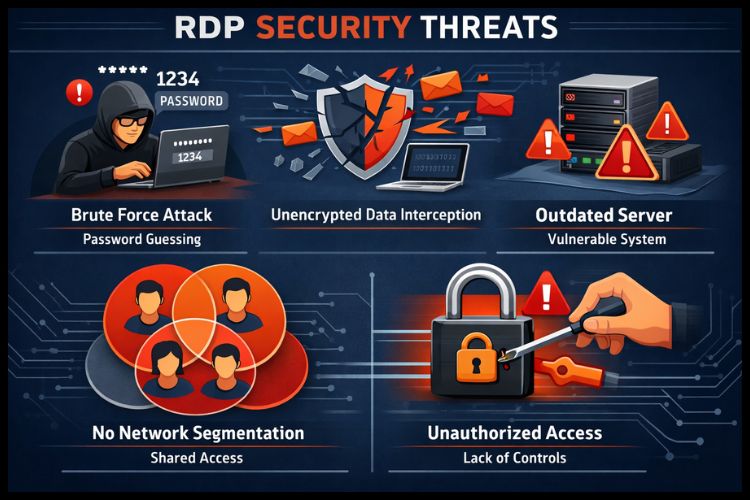
Common RDP Security Vulnerabilities
1. Weak Authentication
Standard RDP uses username and password authentication by default. Without additional security measures, brute force attacks become a realistic threat. Attackers use automated tools to attempt countless password combinations until one succeeds.
2. Unencrypted Connections
While modern RDP implementations include encryption, poorly configured systems or legacy setups may transmit data without adequate security protocols, potentially exposing sensitive information in transit.
3. Lack of Network Segmentation
Many affordable RDP providers expose their servers directly to the internet without proper firewall rules or network isolation, making them easy targets for automated scanners and attack tools.
4. Outdated Server Infrastructure
RDP vulnerabilities are discovered regularly. Providers using older Windows Server versions or failing to apply security patches create exploitable gaps that cybercriminals actively target.
5. Insufficient Access Controls
Without proper role-based access management, multiple users on a shared system can potentially access sensitive data or configurations they shouldn’t interact with.
The Cost vs. Security Trade-off: The Reality
Here’s the hard truth: truly cheap RDP doesn’t necessarily mean insecure RDP, but the market does present a spectrum of approaches.
What "Cheap" Actually Means
Some providers achieve low pricing through operational efficiency and smart resource allocation, optimizing infrastructure, automation, and customer management. These providers offer security without excess overhead.
Others cut costs by eliminating security features entirely: they skip advanced monitoring, avoid security certifications, implement minimal encryption standards, and provide no proactive threat detection.
The difference between these two approaches often comes down to provider philosophy. A responsible RDP provider recognizes that security isn’t a luxury,it’s a fundamental requirement that must be built into every layer of infrastructure from day one.
What Does Buy RDP Offer in Terms of Security?
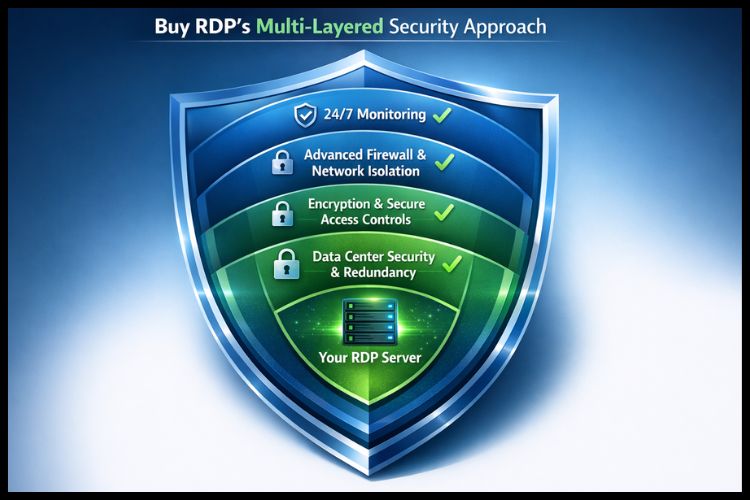
When evaluating RDP providers, it’s essential to examine what specific protections they implement. Buy RDP addresses the core security concerns through a combination of technical infrastructure and operational practices.
Advanced Control Panel with Secure Access
Buy RDP provides users with a modern, updated control panel interface that incorporates a security-first design. Rather than exposing raw server administration unnecessarily, the control panel implements:
Role-based access controls ensure users only interact with their own resources
Activity logging that tracks administrative actions for audit purposes
Secure session management that prevents unauthorized access even if credentials are compromised temporarily
Dedicated IP Options and Network Isolation
For users requiring maximum security, Buy RDP’s Admin RDP and specialized plans include dedicated IP addresses. This isolation prevents your connection from being associated with potentially suspicious activity from other users on shared infrastructure,a critical consideration for users handling sensitive operations.
99.9% Uptime Guarantee Through Redundancy
Security isn’t just about preventing attacks; it’s also about maintaining availability. Buy RDP’s infrastructure commitment of 99.9% uptime indicates investment in redundant systems, failover mechanisms, and disaster recovery capabilities. This infrastructure-level resilience prevents service disruptions that attackers often exploit.
High-Density Data Center Operations
Buy RDP operates high-density data centers staffed by qualified personnel. This physical security infrastructure, combined with network monitoring and maintenance, means your RDP environment benefits from:
24/7 monitoring of server performance and unusual activity patterns
Professional maintenance ensuring patches and security updates are applied promptly
Controlled physical access to server hardware
Environmental controls (cooling, power management) that prevent infrastructure failures
24/7 Expert Support
A significant security advantage often overlooked is responsive technical support. Buy RDP’s round-the-clock support team enables:
Rapid response to security concerns or anomalous activity
Expert guidance on configuring RDP securely for your specific use case
Immediate assistance if you suspect unauthorized access or suspicious behavior
RDP Security Best Practices for Users
While your provider bears responsibility for infrastructure security, users must implement their own protective measures. Here’s what Buy RDP users should prioritize:
1. Use Strong, Unique Credentials
Use complex passwords (15+ characters) combining uppercase, lowercase, numbers, and symbols. Consider using a password manager. Never reuse RDP passwords across multiple services.
Where your provider supports additional authentication mechanisms, use them. This prevents account compromise even if credentials are leaked.
3. Change Default RDP Port (3389)
Running RDP on the standard port 3389 makes it trivial for automated scanners to find your connection. Many Buy RDP users change this to a non-standard port as an additional layer of obscurity.
4. Implement Firewall Rules
Restrict RDP access to specific IP addresses or geographic regions if your use case allows. This simple step eliminates the vast majority of automated attack attempts.
5. Update Systems Regularly
Install Windows Server patches and security updates on your RDP system promptly. Vulnerabilities in the underlying OS can bypass all RDP-level security measures.
6. Monitor for Suspicious Activity**
Regularly review login logs and check for unauthorized access attempts. Buy RDP’s support team can help identify unusual patterns.
7. Avoid Installing Untrusted Software**
Particularly on shared RDP systems, be cautious about application downloads. Malware can compromise your data or use your RDP for further attacks.
The eKYC Requirement: Why India-Based RDP Requires Verification
If you’re purchasing an Indian location RDP from Buy RDP, you’ll encounter a requirement for eKYC (electronic Know Your Customer) verification. This isn’t bureaucratic overhead, it’s a security-enhancing measure aligned with government directives under Section 70B of the Information Technology Act, 2000.
eKYC verification:
Prevents anonymized abuse of RDP infrastructure for malicious purposes
Creates accountability by establishing verified identities
Complies with regulatory requirements protecting both provider and user
Reduces the risk that your provider’s infrastructure is used for cybercrimes that could affect service availability
While verification requires uploading government-issued ID, this protects the integrity of the RDP service for all users.
What You're Really Paying For
When you purchase RDP from a responsible provider, your investment covers:
Infrastructure costs: Data center real estate, power, cooling, and network connectivity
Security implementation: Firewalls, intrusion detection, encryption systems, and monitoring
Personnel: System administrators, security engineers, and support staff
Compliance: Legal documentation, certifications, and regulatory compliance
Redundancy: Backup systems, failover mechanisms, and disaster recovery capabilities
Genuinely cheap RDP that includes these elements is the result of operational efficiency,not security negligence.
Conclusion
Security and affordability aren’t mutually exclusive in the RDP market. What matters is selecting a provider that achieves cost efficiency through smart operations and infrastructure investment rather than security shortcuts.
Start with an RDP demo if you’re uncertain. Buy RDP offers trial access, a confidence indicator that most providers cutting corners would never consider. Because genuinely secure RDP is built to withstand scrutiny, not hide from it.
Frequently Asked Questions
Q1: Should I close my RDP when not in use?
Yes. Always log out and disconnect when finished using RDP. Don’t leave sessions running indefinitely. Closed connections eliminate the window for session hijacking or unauthorized use.
Q2: Is it safe to access RDP from public Wi-Fi?
Not ideal. Public Wi-Fi is vulnerable to eavesdropping. If necessary, use a VPN to encrypt your traffic before reaching RDP. This is especially important for traders or users accessing sensitive data.
Q3: Can I share my RDP credentials with colleagues?
Not recommended. Sharing credentials eliminates accountability, you won’t know who made specific changes. Instead, ask Buy RDP about multi-user plans where each colleague gets their own credentials with isolated access.
Summary
Article Name
How Secure is Cheap RDP and What Protection Does Buy RDP Offer?
Description
Let's explore the security landscape of RDP services and examine what genuine protection looks like.
Leave a comment